How can I save money on Google Ads? You save money on Google Ads by focusing on high-intent keywords, using negative keywords aggressively, and avoiding expansion tactics that increase spend without improving lead quality.
This guide is grounded in personal experience managing Google Ads accounts over many years, across companies of every size, from small local businesses to complex, multi-campaign accounts. I want to be clear about one thing up front: Google is the best advertising platform in the world at what it does. The auction works. The data is deep. The tooling is exceptional.
The friction doesn’t come from Google being ineffective. It comes from incentives.
Many of the recommendations inside a Google Ads account are optimized for Google’s KPIs, spend velocity, click volume, coverage, and machine learning confidence, not necessarily your KPIs, profitability, lead quality, or customer lifetime value. For advertisers with little experience, those recommendations are often helpful. They provide a strong baseline and prevent obvious mistakes.
But once you’ve managed accounts long enough, a pattern becomes obvious.
I’ve seen firms of all sizes spend far too much on PPC by assuming that any engagement is progress. Visibility feels like growth. Clicks feel productive. Dashboards light up. Revenue, quietly, does not.
The uncomfortable truth is that most keywords have a zero-percent chance of ever producing a customer. They attract researchers, students, job seekers, or people solving an adjacent problem. Google will happily sell you all of that traffic, because from the platform’s perspective, it is working exactly as designed.
Saving money on Google Ads does not require rejecting automation or ignoring recommendations out of principle. You don’t need to follow every tactic in this guide dogmatically either. What matters is judgment.
The fastest way to reduce wasted spend is restraint. Knowing when not to expand. Being deliberate about what you exclude. Understanding that what improves Google’s learning model does not always improve your bottom line.
The principles below are not theoretical. They are patterns that have worked consistently across accounts, industries, and budgets. They exist to help you stop paying for noise and start buying intent.
Table of Contents
1. Use Long-Tail Keywords to Collapse Ambiguity
Long-tail keywords are search phrases of four words or more. They work because they eliminate guesswork.
A search like “editing software” tells you nothing. A search like “conference presentation image editing service” tells you almost everything.
Google often encourages broad match usage, and in some cases it makes sense. But broad match only behaves predictably when the underlying keyword is already specific. Long-tail terms signal intent, context, and urgency in a way short phrases never can.
Historically, most conversions come from these longer, more explicit queries. They are where buyers self-identify.
If you already know your long-tail terms, phrase and exact match will almost always outperform broad match. Automation is not a substitute for clarity.
2. Stop Using Broad Match as a Discovery Tool
A search term is a set of words that a user enters into a search, while a keyword is a word that a user enters into an Ad group. Depending on the match type, a search term can match with variants of a keyword.
Broad match doesn’t find customers. It finds volume, then charges you to sort it out.
A keyword is your instruction to Google. A search term is what the user actually typed. Broad match allows Google to bridge that gap aggressively, often creatively, and frequently expensively.
Imagine you sell "image editing for conference presentations", a very specific niche. A single broad keyword like “editing” can trigger searches such as:
Broad Match Keyword
Actual Search Term Triggered
Buyer Intent
Monthly Search Volume
Editing
Image editing
❌ Selfie editing
20k
Editing
Video editing
❌ Youtube video editing
200k
Editing
Instagram edits
❌ Tips for editing Instagram pictures
100k
Editing
English editing
❌ English paper proofreading
110k
Editing
Video edit software
❌ Free editing tools for selfies
210k
Editing
Best image edits 2022
❌ A list of really good selfies
300k
Editing
Conference image editing
✅ Buyer (your service)
1k
Broad match makes campaign setup easier, but it shifts the cost of learning onto your budget. Unless you are tightly constrained by negatives and intent filters, it will happily spend on relevance theater.
3. Use Negative Keywords as Account Architecture
Negative keywords are not cleanup. They are design.
A keyword represents intent. A search term is the sentence someone used to express it. When those sentences reveal misunderstanding, disqualify them permanently.
If you advertise “attorney” and receive searches like “free employment lawyers”.
Add those terms as exact-match negatives and move on.
Broad-match negatives should be used sparingly. They cast wide shadows and can block legitimate traffic. Exact negatives are precise, safe, and scalable.
If a search term required explanation to justify, it should be negated.
Keyword negative lists are handy if you can quickly identify what is irrelevant to your product. For example, if you sell video editing, you might not sell English editing, so negativing words in that entire industry might be a great use of a negative keyword list.
4. Improve Quality Score by Removing Friction
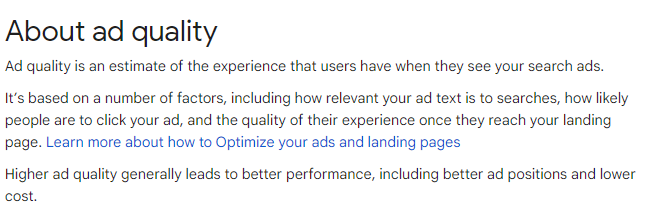
The Quality Score is a rating that Google gives each of your keywords based on your ad's landing page, ad relevance, and expected click-through rate. This rating is a number that ranges from 1 to 10, where a higher Quality Score indicates a better Ad Rank.
The Quality Score is not input at auction time but is a diagnostic tool for Ad Rank. Ad Rank is the elegant name for the Google Ads auction.
The Quality Score is composed of three parts.
Clickthrough Rate (CTR) has a significant impact on the Quality Score. Therefore, improve your CTR through audience targeting, headlines, promotions, or extensions.
Ad relevance will affect your quality score, so put your keywords in your headlines and landing page.
The landing page experience will affect your quality score as well. Consider your core web vitals.
Therefore, advertisers often strive to optimize their campaigns to improve Quality Scores and enhance the overall effectiveness of their online advertising.
You cannot game Quality Score, but you can remove friction:
Put the keyword in the headline
Answer the query immediately on the landing page
Make the page fast and mobile-friendly
Use ad extensions consistently
Quality Score is not calculated at auction time, but it reflects how relevant your ads have been. Treat it like a credit report.
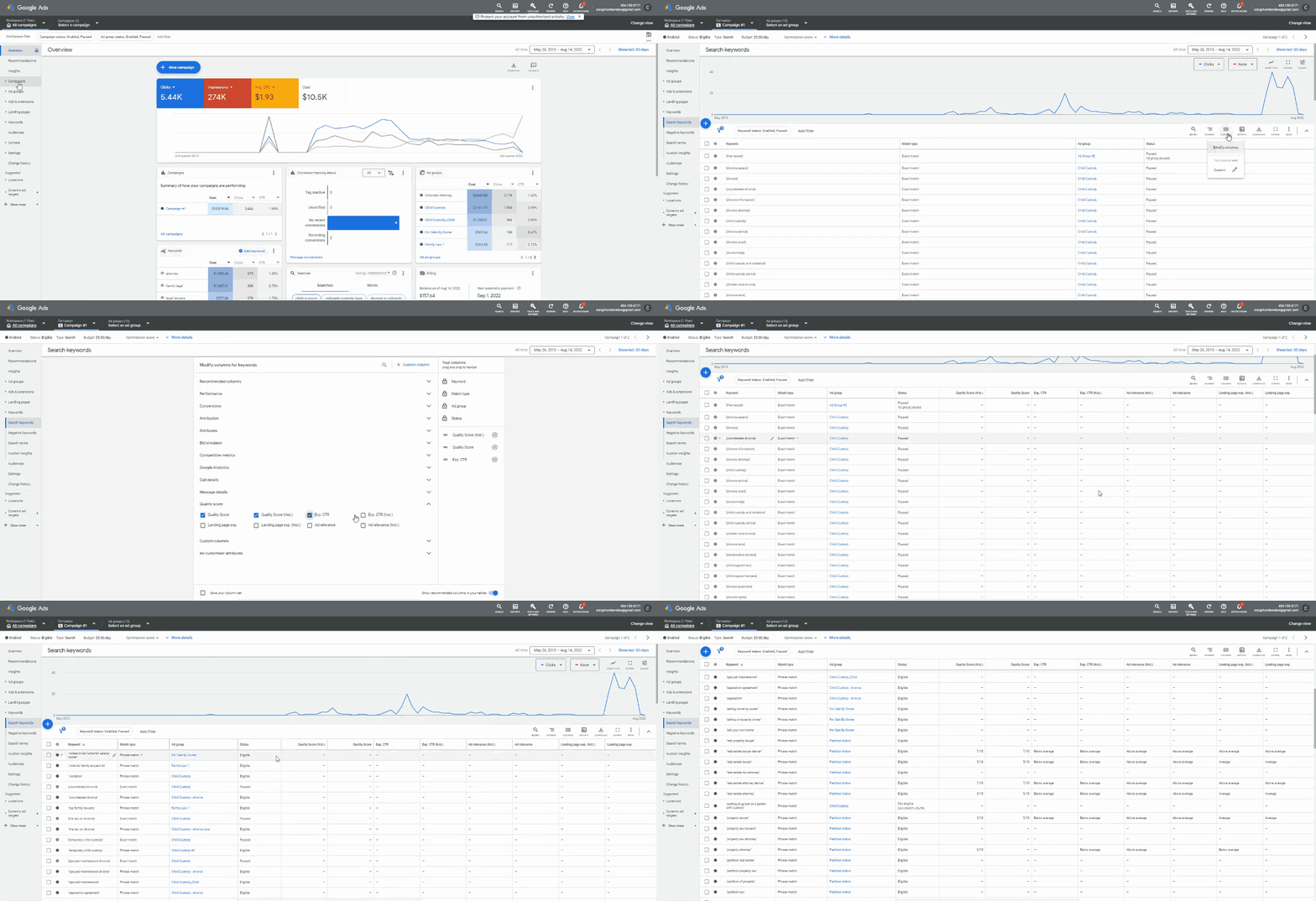
The quality score is accessible only to keywords with more than 500 impressions. To access your quality score, follow these steps.
Step-by-Step Instructions
Go to your Adwords Account
Select a Search Campaign
Click Keywords
Click Columns on the right
Type in Quality Score in the search box
Select each Quality Score Metric
Click Apply
Account > Campaign > Keyword > Columns > Type in Quality Score > Select All Quality Score Metrics > Click Apply
5. Treat Ad Copy as a Filter, Not a Teaser
Ad text should repel the wrong clicks as much as it attracts the right ones.
Dynamic headlines sound efficient, but combined with dynamic ad groups they often produce surreal results, ads advertising services you do not actually offer.
Automation excels at speed. It struggles with judgment.
Write ads as if the searcher is skeptical, impatient, and comparing you to three alternatives. Clear value beats clever language. Precision beats hype.
When the ad reflects exactly what the user expects to find, both CTR and Quality Score improve naturally.
6. Turn Off the Display Network for Search Campaigns
If you are running a Search campaign, your ads do not need to appear on the Google Display Network. Search and display serve completely different purposes, and mixing them is one of the easiest ways to waste budget.
By default, Google often enables Display expansion on Search campaigns, especially for newer or auto-created campaigns.
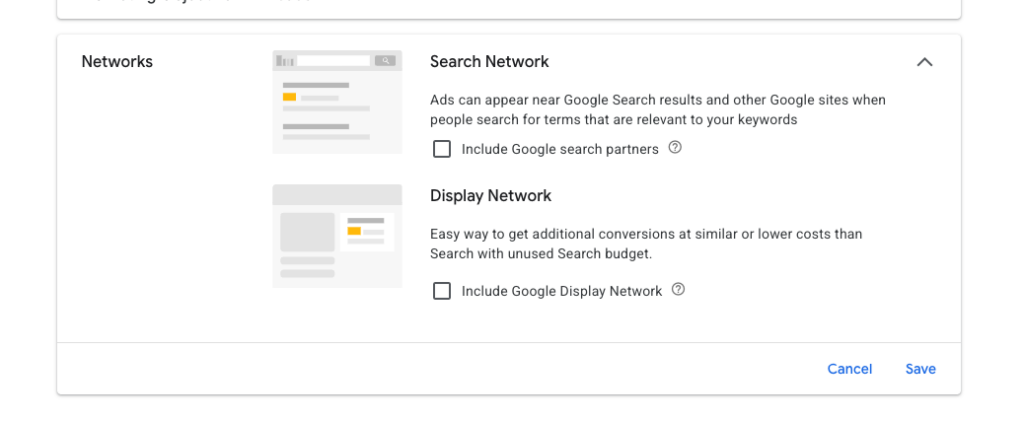
Here’s how to turn it off.
Step-by-Step Instructions
Sign in to your Google Ads account
From the left-hand menu, click Campaigns
Select the Search campaign you want to edit
Click Settings
Open the Networks section
Under “Networks,” uncheck:
Include Google Display Network
Leave Search Network checked
Click Save
That’s it. Your ads will now only appear when someone is actively searching.
Since GDN ads are usually the cheapest form of advertising in terms of cost per impression, they can be a cost-effective way to reach many people at once. However, the GDN should not be your first choice for PPC advertising, especially if your business is starting.
The display network is like a billboard, whereas the search network is like a phone book. Depending on your targeting, a person typing your services on search is likely in the market for your assistance. Users in paid search are at the end of the funnel. They've already tried doing it themselves and realized they need to call a professional.
The display network is much like a billboard because people are browsing the web on websites that may have little to do with your services. For example, they might read a blog or shop for an unrelated item. So they're passing by your ads and probably will not interact with them.
Many businesses find that GDN ads have a high bounce rate and that those who convert often have unrealistic expectations of your product or service.
When Display Does Make Sense
Display campaigns are useful when:
You are retargeting past visitors
You are running brand awareness campaigns
You have a clear upper-funnel strategy and budget
They should almost always live in separate campaigns, with separate budgets and expectations.
7. Exclude Gaming Content on Display Campaigns
If you have to advertise on the display network, try this simple cost-saving trick: turn off all ads targeting gaming.
Content exclusions are great broad-level targeting options that all display campaigns should examine.
Why not exclude adult content which might not fit your brand?
Content Exclusions can be found by going to Campaigns > YOUR CAMPAIGN > Settings > Additional Settings > Content Exclusions.
Gaming is one of the worst offenders in your display advertising. I've seen campaigns that dedicated most of their budget to advertising within kids' games. Advertising in the gaming category is notoriously ineffective. It's so weak, and it's known just how soft that content category is to advertise to just about everybody, including Google, that Google had to prevent you from being able to exclude gaming from your targeting.
See the image below. Note that you cannot quickly turn off gaming in the default settings.
Content Exclusion Gaming
The gaming content category can be ineffective because you end up advertising to apps associated with a profile. And a parent might have kids tied to their Google account.
That means your ads show on kids' apps. Like "Lipstick Unicorn." And all those clicks are misclicks from children. It's entirely up to you to determine if this is the right place for your ads. I think for most businesses; it is not.
It also makes me question why Google thinks it's ok to advertise certain things to my six-year-olds, whose tablets can only be connected to a parent profile.
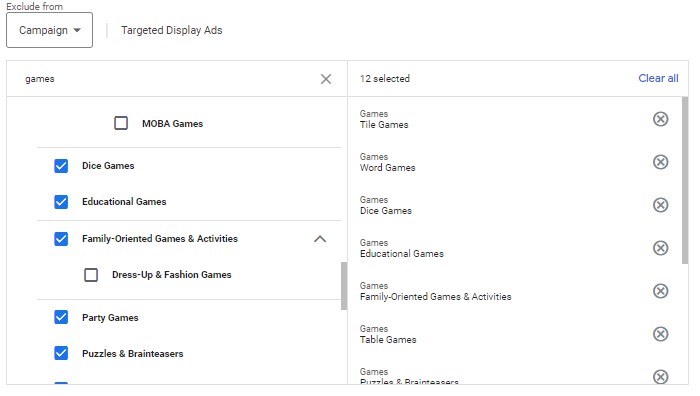
To exclude gaming, you have to do it at the topic level.
To exclude topics. Go to Campaigns > YOUR CAMPAIGN > Content > Exclusions > (Pencil Icon) Exclude Topics. Then type "Games" in the search field and select as many gaming topics as possible.
Gaming Exclusions
8. Target Locations Based on Presence, Not Interest
So, how do you decide which locations to target? Given enough data, I think you'd find that your customers live somewhere. Meaning that they don't live everywhere.
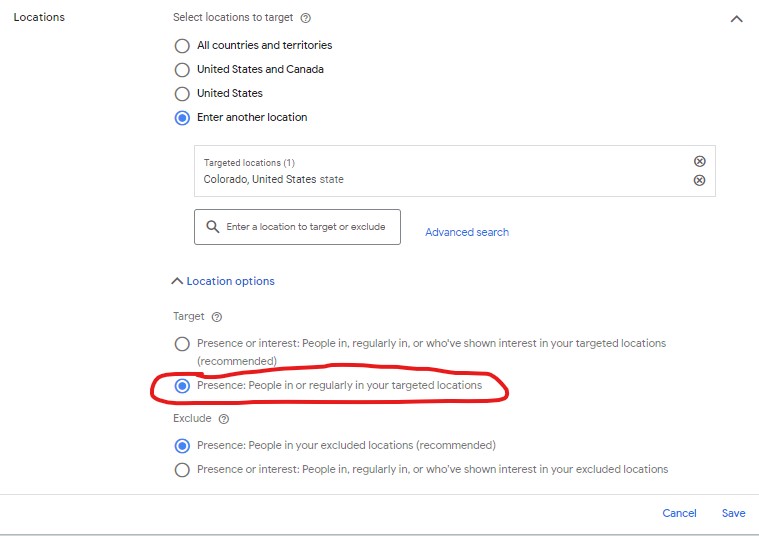
Switch to Presence: people in or regularly in your targeted locations.
Presence in Adwords
To change your location targeting. Go to Campaigns > YOUR CAMPAIGN > Settings > Locations > Locations Options > "Presence: People in or regularly in your targeted locations."
The issue with the recommended setting is that people can Google "Colorado" but live in, let's say, Texas.
Even if you have a business that doesn't have a physical presence in a specific location, you can still show your ads to users searching a specific area.
If your business has brick and mortar location, keep in mind most people will not drive more than 2 miles from their home once off the clock, so it is probably a waste of money to target a whole zip code or even more than a few miles around your location. Also, remember that people commute to work an average of 35 minutes, so somewhere in that range is probably the suitable range for your business.
That city that is 90 minutes away? That's probably too broad.
Google's Keyword planner can help you determine how much a click could cost in a specific location.
Internet real estate is like regular real estate in that a location-specific ad in New York could cost more than one in Wyoming. If you're an eCommerce company, sometimes advertising where others aren't is a good strategy.
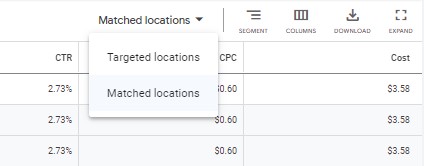
To find what locations are working for your business. Go to Campaigns > YOUR CAMPAIGN > (From the left sidebar) Locations > Select from the dropdown "Matched or Targeted locations."
9. Use Single Keyword Ad Groups for Control
Single keyword ad groups are not about scale. They are about control.
Each ad group represents one idea, one intent, one promise. That makes it easier to:
Write precise ads
Apply surgical negatives
Align landing pages perfectly
SKAGs take more effort to build, but they reward discipline with clarity. When performance changes, you know exactly why.
Single keyword ad groups are also helpful because they can help you achieve better Quality Scores. Your single keyword can perfectly match your ads and landing pages.
Single-keyword groups are effective because you can combine highly relevant ad text with negative keywords and a relevant landing page.
10. Stop Paying for the Top Spot Automatically
The top position often costs two to three times more than the one beneath it.
More visibility does not always mean more sales. Many users consciously skip the first result because they recognize it as an ad.
Different advertisers tolerate different economics based on Quality Score, margins, and funnel depth. The top spot might work for one company and quietly drain another.
Bidding slightly lower can preserve volume and dramatically reduce cost.
Paying less per click often produces more profit per customer.
Final Thought
Google Ads punishes impatience and rewards precision.
The fastest way to waste money is to chase volume. The fastest way to make it work is to decide, in advance, who you are willing to ignore.
If you had told me a couple of years ago that I could type "a cyberpunk hedgehog making a latte" and get a photorealistic 4K video back in seconds, I would have laughed. But here we are in 2026, and AI video generation isn't just a novelty anymore, it's a massive part of my daily workflow.
This guide leverages my experience to break down how to write, structure, and publish a document that earns trust rather than just demanding attention.
Depending on who you ask, there are anywhere from five to twenty "essential" rules out there. But in my experience, there are really only a dozen “laws” of visual design that matter across every medium. Here’s a guide I’ve created with the elements I find to be the most important, no matter your platform.
I love WordPress for its customizations. Styling code snippets enhances user perceptions. Copy and paste the code below to style your WordPress code blocks.
If you had told me a couple of years ago that I could type "a cyberpunk hedgehog making a latte" and get a photorealistic 4K video back in seconds, I would have laughed. But here we are in 2026, and AI video generation isn't just a novelty anymore, it's a massive part of my daily workflow.
This guide leverages my experience to break down how to write, structure, and publish a document that earns trust rather than just demanding attention.
Depending on who you ask, there are anywhere from five to twenty "essential" rules out there. But in my experience, there are really only a dozen “laws” of visual design that matter across every medium. Here’s a guide I’ve created with the elements I find to be the most important, no matter your platform.
I love WordPress for its customizations. Styling code snippets enhances user perceptions. Copy and paste the code below to style your WordPress code blocks.