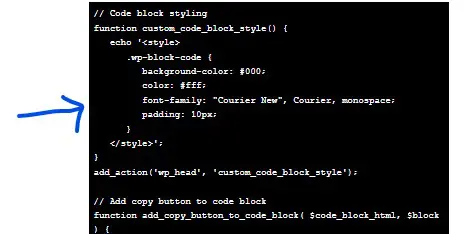
I love WordPress for its customizations. Styling code snippets enhances user perceptions. Copy and paste the code below to style your WordPress code blocks.
I've personally struggled to find this bit of code online, so I've documented the fix here.
The default styling for the <>code block is not ideal; by default, WordPress does not style your code block text, so the code block matches the rest of your webpage. See the examples below.
Default stylingIdeal styling
I don't know about you, but I want my code block to have a copy-and-paste button and a black background. This is better for users as well as visually. For speed reasons, I'm also averse to having a bunch of plugins that only do one single thing. So I solve this issue by styling the code block with plugins that I'm already using.
Here is how you can style the default WordPress code block to have a black background and white text. Which also has a simple copy-paste button at the top, all while using the free Code Snippets plugin:
Install and activate the Code Snippets plugin.
Go to Snippets > Add New.
Give your snippet a title and paste the following code:
In the WordPress block editor, add the Code Block element to your page or post.
Enter your code in the Code Block element and publish your page or post.
The code block in the WordPress block editor should now have a black background, text that looks like coding, and a simple copy-paste button that works at the top on the frontend.
If you had told me a couple of years ago that I could type "a cyberpunk hedgehog making a latte" and get a photorealistic 4K video back in seconds, I would have laughed. But here we are in 2026, and AI video generation isn't just a novelty anymore, it's a massive part of my daily workflow.
This guide leverages my experience to break down how to write, structure, and publish a document that earns trust rather than just demanding attention.
Depending on who you ask, there are anywhere from five to twenty "essential" rules out there. But in my experience, there are really only a dozen “laws” of visual design that matter across every medium. Here’s a guide I’ve created with the elements I find to be the most important, no matter your platform.
I love WordPress for its customizations. Styling code snippets enhances user perceptions. Copy and paste the code below to style your WordPress code blocks.
If you had told me a couple of years ago that I could type "a cyberpunk hedgehog making a latte" and get a photorealistic 4K video back in seconds, I would have laughed. But here we are in 2026, and AI video generation isn't just a novelty anymore, it's a massive part of my daily workflow.
This guide leverages my experience to break down how to write, structure, and publish a document that earns trust rather than just demanding attention.
Depending on who you ask, there are anywhere from five to twenty "essential" rules out there. But in my experience, there are really only a dozen “laws” of visual design that matter across every medium. Here’s a guide I’ve created with the elements I find to be the most important, no matter your platform.
I love WordPress for its customizations. Styling code snippets enhances user perceptions. Copy and paste the code below to style your WordPress code blocks.